Most people still use AI agents manually.
They type in a task.
Wait for an answer.
Check the result themselves.
Fix the errors themselves.
Then type the next prompt.
This means the human is still playing the role of the loop.
The next stage of development will be different.
You don't just hand prompts to the agent.
You design a loop that can:
Feed prompts to the agent itself
Check the results
Decide the next step
Keep running until the work meets the standard
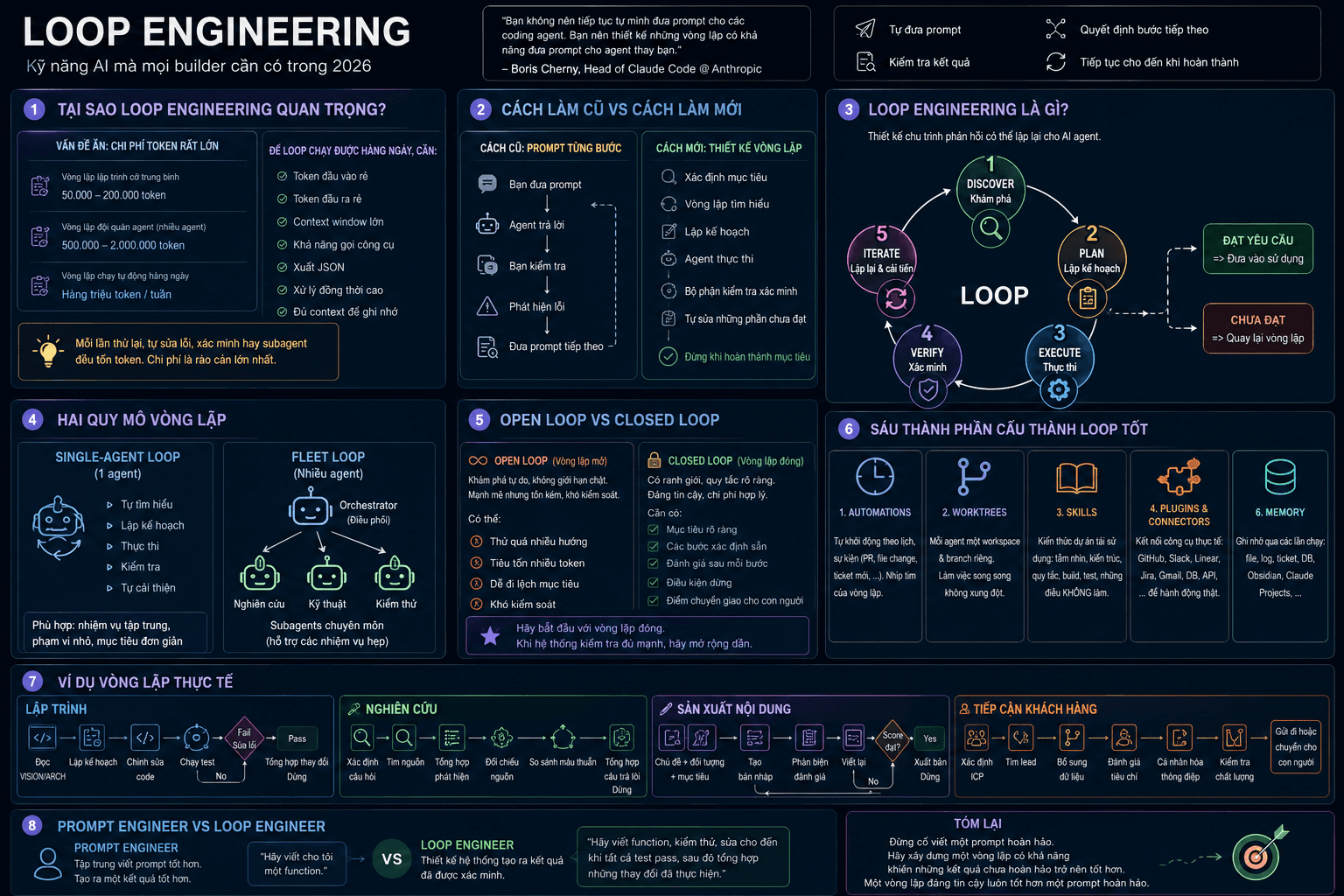
That is Loop Engineering — the craft of designing loops for AI agents.
"You shouldn't keep feeding prompts to coding agents yourself. You should design loops that can feed prompts to the agent for you."
Boris Cherny, who leads Claude Code at Anthropic, put the same idea another way:
"I no longer prompt Claude directly. I have loops running that prompt Claude and decide what to do on their own. My job is to write those loops."
1. WHY HAVE MOST PEOPLE NEVER BUILT A REAL LOOP?
AI loops sound wonderful — until you see the token bill.
A typical agent loop can consume a huge amount of context in a short time:
A medium-sized coding loop can use 50,000–200,000 tokens
A "fleet of agents" loop, with one orchestrator and many specialist agents, can use 500,000–2 million tokens
A loop running automatically every day can consume millions of tokens per week
Every retry costs tokens.
Every self-fix costs tokens.
Every verification step costs tokens.
Every subagent costs tokens.
This is the hidden problem few people talk about.
Loop Engineering isn't hard because the idea is too complex.
It's hard because most people can't afford to let an agent run freely for long stretches.
A fair reaction is:
"Easy for you to say — you have unlimited OpenAI access."
This is exactly why long-context, low-cost models matter.
For loops to run daily, you need:
Cheap input tokens
Cheap output tokens
A large context window
Tool-calling ability
JSON output ability
High concurrency
Enough context to remember what happened earlier in the loop
Without these, loops are just expensive experiments.
With them, they become real workflows.
2. THE OLD WAY AND THE NEW WAY
Over the past two years, most people used AI agents like this:
You give a prompt.
The agent answers.
You check.
You spot an error.
You prompt again.
This works, but it doesn't scale.
The old way
You give a prompt
The agent produces a result
You check the result
You fix the weak parts
You keep iterating manually
The new way
You define the goal
The loop figures out what's needed
The loop plans the work
The agent executes
A component verifies the result
The loop fixes whatever falls short
The system stops when the goal is met
Prompting hands the agent one instruction.
Loop Engineering hands the agent a complete job.
3. WHAT IS LOOP ENGINEERING, REALLY?
Loop Engineering is the practice of designing repeatable feedback cycles for AI agents.
The goal is simple:
Go from an initial attempt to a verified result without a human steering every step.
A basic loop has five stages:
Discover
Plan
Execute
Verify
Iterate
If the result meets the standard, ship it.
If it doesn't, send it back into the loop.
That's the whole idea.
It's not about writing one perfect prompt.
It's about building a system that continuously improves the result until it meets the standard.
4. SINGLE-AGENT LOOPS AND MULTI-AGENT LOOPS
There are two basic loop scales.
Single-Agent Loop
One agent handles the whole cycle.
It:
Figures out what's needed
Plans
Does the task
Checks the result
Improves anything that failed
It's like a person reading and editing their own draft.
Good for:
Focused tasks
Small scope
Simple goals
Content drafting
Fixing software bugs
Research synthesis
One brain.
One loop.
Self-improving.
Fleet Loop
A Fleet Loop is larger.
You give the main goal to an orchestrator agent.
This agent splits the work into parts.
Then it assigns each part to specialist agents.
Each specialist agent can also use smaller subagents to handle narrow tasks.
For example, for the task:
"Build a productivity app."
The structure might be:
Orchestrator agent manages the whole task
↓
Research – Engineering – Testing
↓ ↓ ↓
Web search Write code Write tests
Debug Track bugs
This is no longer one agent working alone.
It's like a small team running the whole project from start to finish.
5. OPEN LOOP AND CLOSED LOOP
This is the most important practical distinction.
Not all loops are the same.
Open Loop
An open loop is exploratory.
You give the agent a broad goal and let it find its own way.
This is powerful because the agent can discover things you never specified.
But it's also costly and hard to control.
An open loop can:
Try too many directions
Consume too many tokens
Quickly produce low-quality results
Drift away from the real goal
Become hard to control
Open loops are exciting.
But for most people, they're not the best starting point.
Closed Loop
A closed loop has clear boundaries.
Humans design the path in advance.
The loop still runs on its own, but within specific rules.
A closed loop needs:
A clear goal
Defined steps
Evaluation after each step
Stopping conditions
A handoff point to a human if the system gets stuck
This is the kind of loop actually creating value right now.
It's cheaper.
More reliable.
And produces cleaner results.
Start with a closed loop.
Once your verification is strong enough, you can gradually widen the loop's freedom.
6. THE SIX COMPONENTS OF A GOOD LOOP
Conceptually, each loop has five stages.
But in practice, you need six components to make a loop work.
1. Automations
This is the loop's heartbeat.
Automation lets the loop start itself without you having to remember and run it manually.
For example:
Run every morning
Run when a Pull Request is opened
Run when a file changes
Run when a new ticket appears
Run continuously until all tests pass
If you still have to start everything by hand, the loop isn't truly carrying enough of the work.
2. Worktrees
Worktrees are crucial when multiple agents edit code at once.
Without separation, agents can conflict with each other.
Two agents might edit the same file.
One agent might overwrite another's work.
Worktrees give each agent its own workspace and branch.
That way, many agents can work in parallel without turning the repository into chaos.
3. Skills
Skills are reusable project knowledge.
Instead of explaining the project on every run, you write the important context once.
A good skill file should include:
Product vision
Architecture
Rules
Build steps
Testing steps
Things the agent must never do
Without skills, every loop starts from scratch.
With skills, every loop can start with accumulated context.
4. Plugins and Connectors
A loop that can only see files is very limited.
Connectors let the loop interact with your real tools.
For example:
GitHub
Slack
Linear
Jira
Gmail
Google Drive
Databases
Staging APIs
This is the difference between:
"Here's the fix I'd suggest."
And:
"I opened a Pull Request, linked the ticket, watched CI and posted an update."
5. Subagents
The agent that produces the work and the agent that checks it shouldn't always be the same model.
An agent that writes code tends to be too lenient when grading its own code.
An agent that writes an article may overlook the weak parts of that same piece.
Use separate agents for:
Discovery
Implementation
Review
Testing
Fact-checking
Final synthesis
Quality improves when the reviewer isn't the agent that created the work.
6. Memory
Memory helps the loop retain information across runs.
The model can forget.
But the repository doesn't forget.
Notes don't forget.
The project log doesn't forget.
Memory can be stored in:
Markdown files
A project log
Linear tickets
GitHub Issues
An Obsidian Vault
A database
Claude Projects
A long-running loop needs to know:
What has been tried
What has passed
What has failed
What still needs to be done
Without memory, the system has to start from scratch on every run.
7. REAL-WORLD LOOP EXAMPLES
Coding loop
Read VISION.md and ARCHITECTURE.md
↓
Plan the next change
↓
Edit the code
↓
Run the tests
↓
If tests fail:
Read the error → Fix it → Run the tests again
↓
If tests pass:
Summarize the changes
↓
Stop
The human doesn't need to push each step.
The agent writes, tests, fixes and verifies on its own.
Research loop
Define the research question
↓
Find sources
↓
Synthesize findings
↓
Check claims against sources
↓
Compare conflicting information
↓
Synthesize the final answer
↓
Stop when a confidence threshold is reached
This is far better than just asking AI for a quick summary.
Content-production loop
Define topic + audience + goal
↓
Create a draft
↓
A critic agent evaluates the draft
↓
Rewrite based on the critique
↓
Score against success criteria
↓
If it meets the score → Publish
↓
If not → Keep rewriting
This loop turns an idea into a whole content-production system.
Customer-outreach loop
Define the ICP — ideal customer profile
↓
Find suitable prospects
↓
Enrich company data
↓
Score against criteria
↓
Personalize the message
↓
Quality check
↓
Send it or hand off to a human
They all use the same framework:
Goal.
Action.
Check.
Fix.
Repeat until done.
8. PROMPT ENGINEER VS. LOOP ENGINEER
This is the skill gap starting to form in 2026.
Prompt Engineer
A Prompt Engineer focuses on writing better instructions.
They improve the wording.
They produce a better single result.
But after the AI finishes, the human still has to check everything.
The human is still the feedback loop.
Loop Engineer
A Loop Engineer designs the entire feedback system.
They decide:
What triggers the loop
What context the agent needs
What tools the agent may use
What counts as success
Who or which agent checks the work
When the loop must stop
Where the results are stored
A Prompt Engineer says:
"Write me a function."
A Loop Engineer says:
"Write the function, test it, fix it until all tests pass, then summarize the changes made."
Same toolset.
Completely different mindset.
The people building AI apps who create the most leverage aren't simply writing better English prompts.
They're designing systems that can:
Discover on their own
Plan on their own
Execute on their own
Verify on their own
And stop at the right time
9. THE SHORT VERSION
Loop Engineering is the shift from feeding prompts manually to building automated feedback cycles.
The shift
Old way: Hand the agent one task at a time
New way: Design a loop that runs the whole workflow
The six components you actually need to build
Automation: The heartbeat that starts the loop
Worktree: Lets many agents work in parallel without file conflicts
Skills: Project knowledge reused across runs
Plugins and Connectors: Access to real tools
Subagents: Separate the doer agent from the checker agent
Memory: Helps the loop remember across runs
Two scales
Single-Agent Loop: One agent improving its own work
Fleet Loop: An orchestrator agent combined with specialist agents and subagents
Two loop types
Open Loop: Powerful and exploratory but costly
Closed Loop: Bounded, reliable and reasonably priced
Five stages
Discover
Plan
Execute
Verify
Iterate
The real cost problem
Loops consume tokens very fast
Long-context, low-cost models make loops practical
If tokens aren't cheap enough, most people never get past the experiment stage
The mindset shift
A Prompt Engineer asks AI to produce a result
A Loop Engineer designs a system that produces verified results
That is the real breakthrough.
Stop trying to write one perfect prompt.
Start building a loop that can make imperfect results better.
A reliable loop always beats a perfect prompt.
Comments (0)
No comments yet. Be the first to share your thoughts!